Getting Started
Quick introduction to brain maps and eigenmodes
Patterns on the cortical surface or in the subcortex (“brain maps”) more often than not express with smoothness - spatial autocorrelation. Accounting for this in statistical testing of the associations between or the influence that one brain map has on another is a non-trivial problem. More recently, methods that account for smoothness have been developed, but these carry their own issues (see our paper for an in-depth discussion on this topic).
Eigenmodes of a surface encode all pairwise (auto)correlations (i.e., smoothness). The reason for this is too maths heavy for a quick intro, but suffice to say that this has been discussed many times by people smarter than the people who came up with this method (see References).
Eigenstrapping offers a solution by leveraging this fact, and another property of eigenmodes: they are orthogonal. By taking random rotations of them, one can create new brain maps with the same smoothness but randomized topology. The steps below will help you get started and build your own surrogate maps.
First run
The package comes with example surfaces (and their eigenmodes) and cortical gradient data from Margulies’ 2015 paper (see References). Let’s start by importing the data (this may take a few moments):
>>> from eigenstrapping.datasets import load_surface_examples

>>> # load left and right hemispheres
>>> surf_lh, surf_rh, data_lh, data_rh, emodes_lh, emodes_rh, evals_lh, evals_rh = load_surface_examples(with_surface=True)
>>> surf_lh
'/mnt/eigenstrapping-data/surfaces/space-fsaverage_den-10k_hemi-lh_pial.surf.gii'

>>> data_lh.shape
(10242,)

>>> emodes_lh.shape
(10242, 1000)

>>> evals_lh.shape
(1000,)
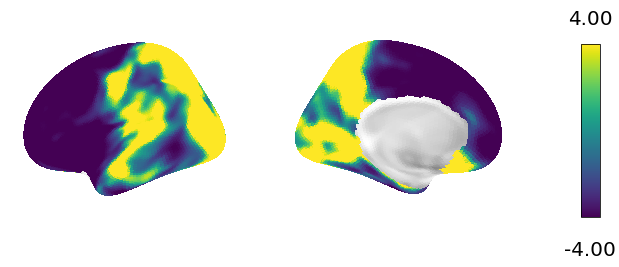
Now let’s plot the data on the surface.
>>> from eigenstrapping.plotting import csplot

>>> csplot(data_lh, 'fsaverage')
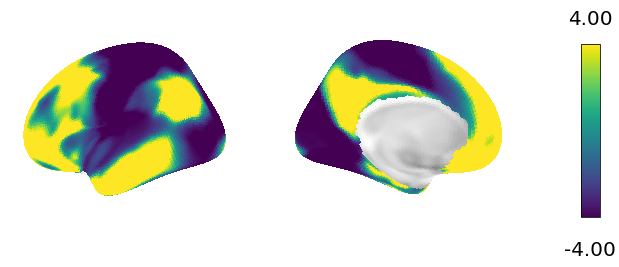
Now let’s make a surrogate brain map and plot it on the surface.
>>> from eigenstrapping import SurfaceEigenstrapping


>>> eigen = SurfaceEigenstrapping(
                data=data_lh,
                emodes=emodes_lh,
                evals=evals_lh,
                num_modes=100,
                resample=True,
                )
No surface given, expecting precomputed eigenvalues and eigenmodes
IMPORTANT: EIGENMODES MUST BE TRUNCATED AT FIRST NON-ZERO MODE FOR THIS FUNCTION TO WORK
>>> surr = eigen.generate()

>>> csplot(surr, 'fsaverage')